Nexer Insight

CTL + ALT + DELISH

Lunch and Learn

Demo

MCP & Agentic Systems to make life easier

Author

Jonathan Jayes

Date

2026-04-16

🎯 What are we aiming for?

Person meditating at desk with laptop

To save time going from β€œWhat shall we have for lunch?” πŸ€” to β€œOrder placed.” βœ…

Person meditating at desk with laptop smiling

πŸ€– What shall we try first?

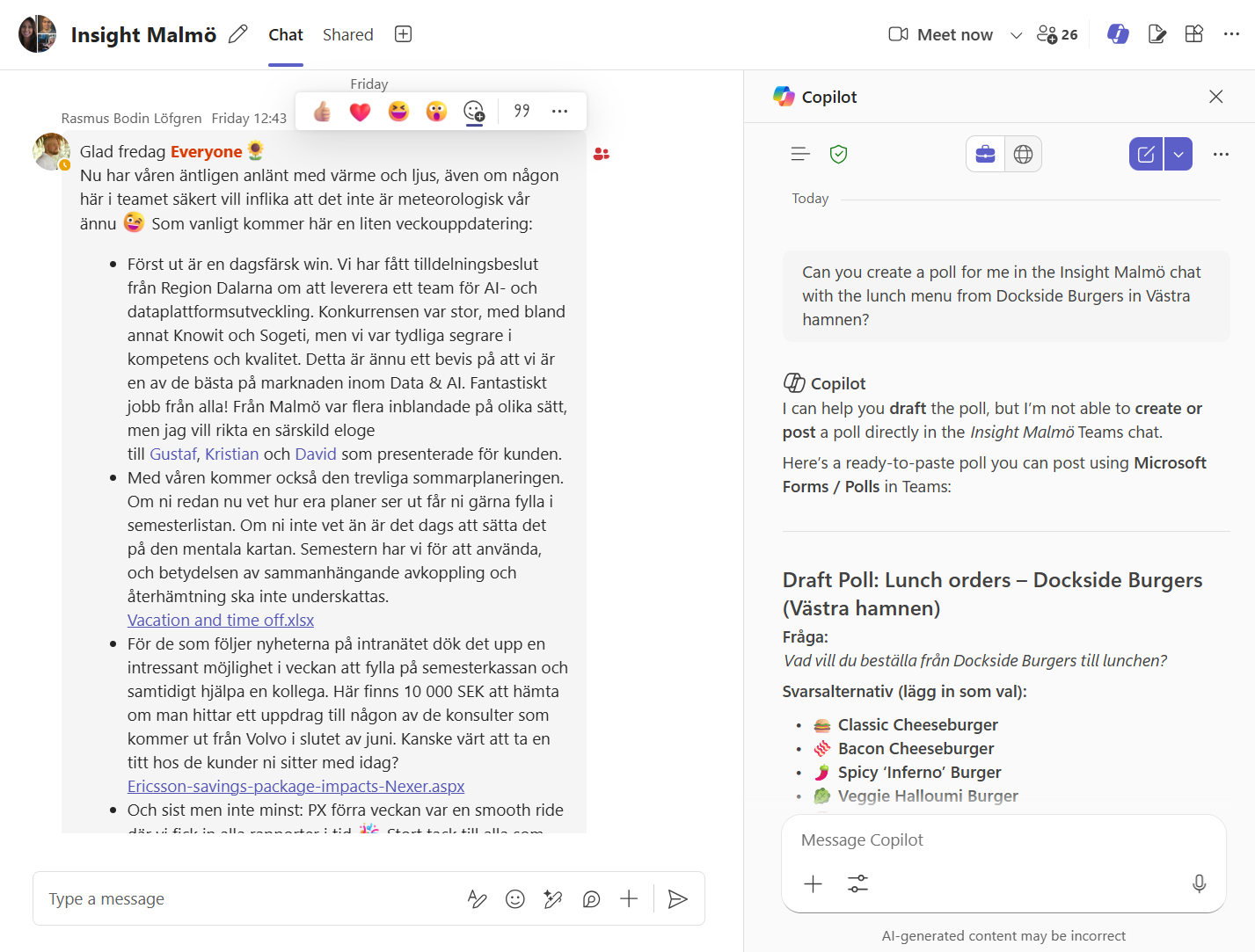
Just ask Copilot in MS Teams

Screenshot of MS Teams Copilot interface

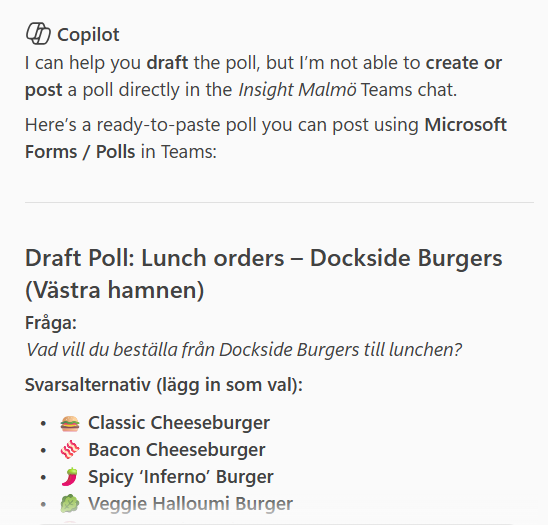
Hmm, it can’t create the poll… 😬

Screenshot of MS Teams Copilot interface with lunch suggestions

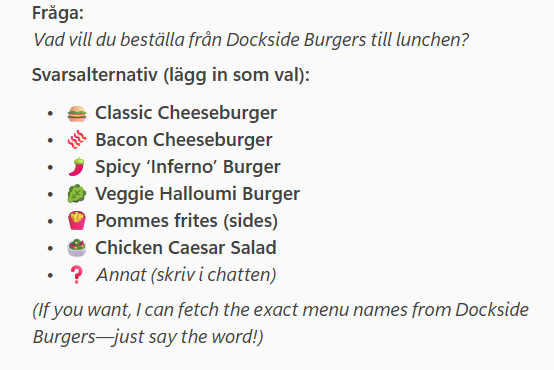
But it can find the menu, right? 🧐

Screenshot of MS Teams Copilot interface with menu suggestions

But it can find the menu, RIGHT? 😰

Screenshot of MS Teams Copilot interface with menu suggestions

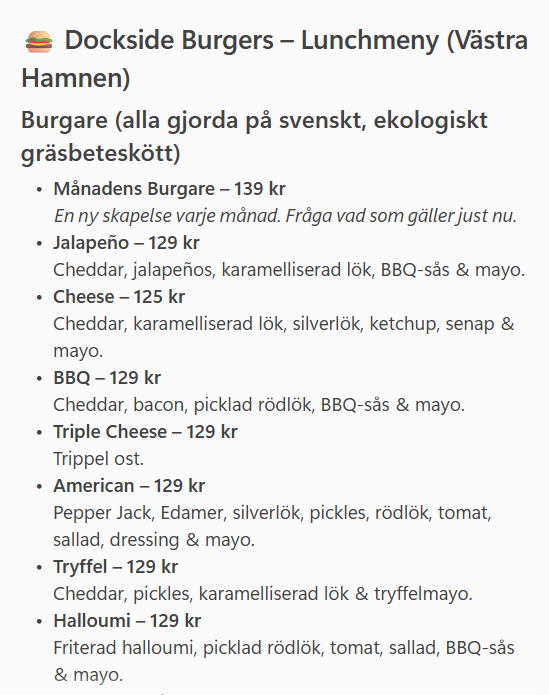
Wrong! 🚫

The lunch menu has a smaller selection of burgers, and all go for 125 SEK.

😞 So, Copilot in MS Teams can’t help us with lunch decisions yet.

πŸ’‘ What could we do instead?

Deterministic approach? πŸ”§

We could write a scraper to visit the restaurant websites, and extract the menu information from there.

Where does this solution fail? πŸ’₯

The website menus are quite varied, for example,

  • Dockside’s menu is a PDF that updates monthly

  • Holy Greens’ menu is a javascript page that shows available options and prices per restaurant location

  • Reka’s Burgers menu is a static HTML page that hasn’t changed since last year

  • We could write custom scrapers for each restaurant, but that would be a lot of work, and would break easily if the website changes.

So, let’s try giving the system more agency to achieve specific goals πŸš€

Follow along on GitHub at github.com/j-jayes/literate-broccoli

πŸ›€οΈ The Road to a Working Solution

πŸ“± The App in Action

Step 1 β€” Sign In

The admin authenticates with a shared team password before accessing the ordering panel.
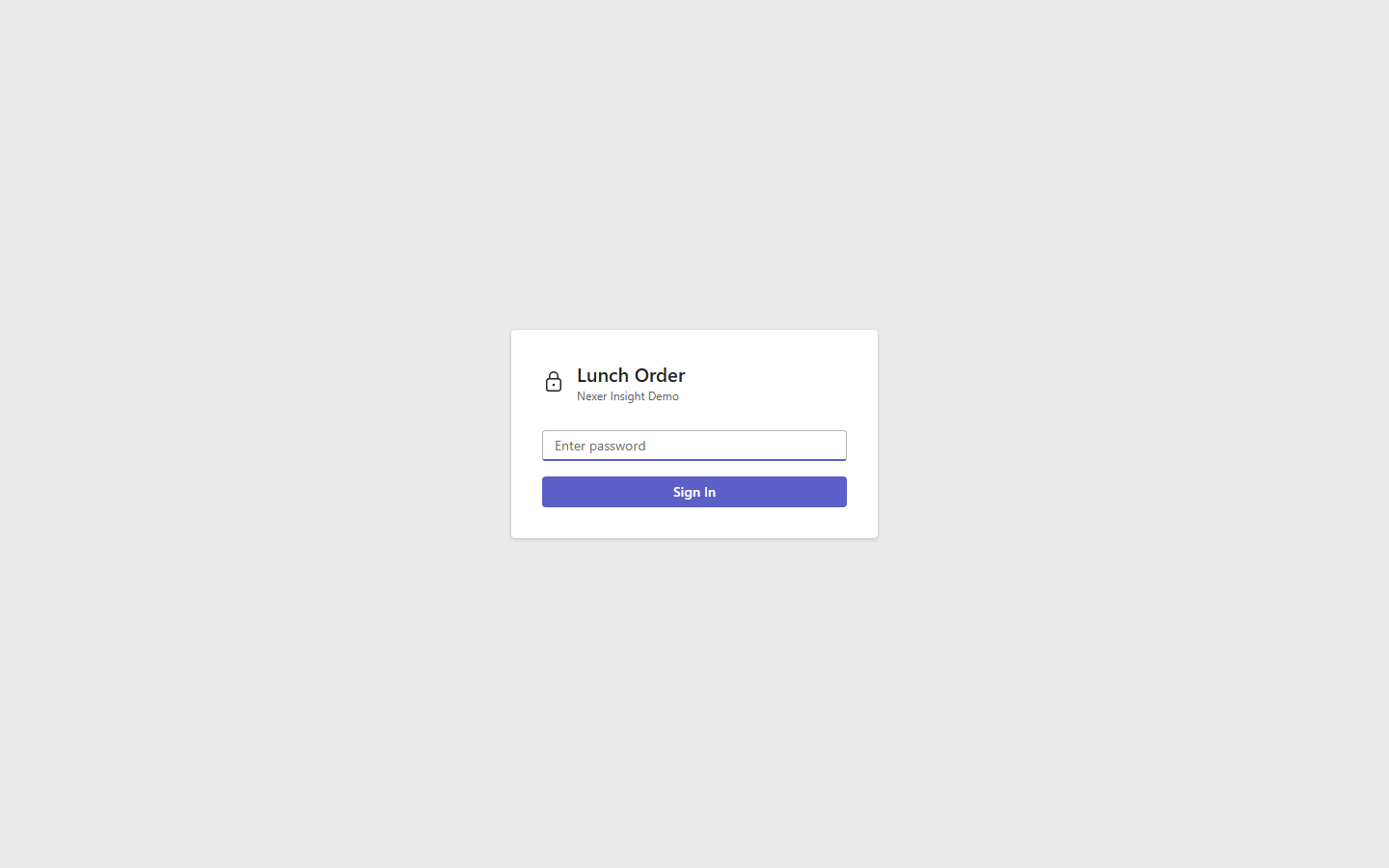
Login screen

Step 2 β€” Select Today’s Restaurants

Pre-scraped menus load instantly. The admin picks which restaurants to include in today’s poll.
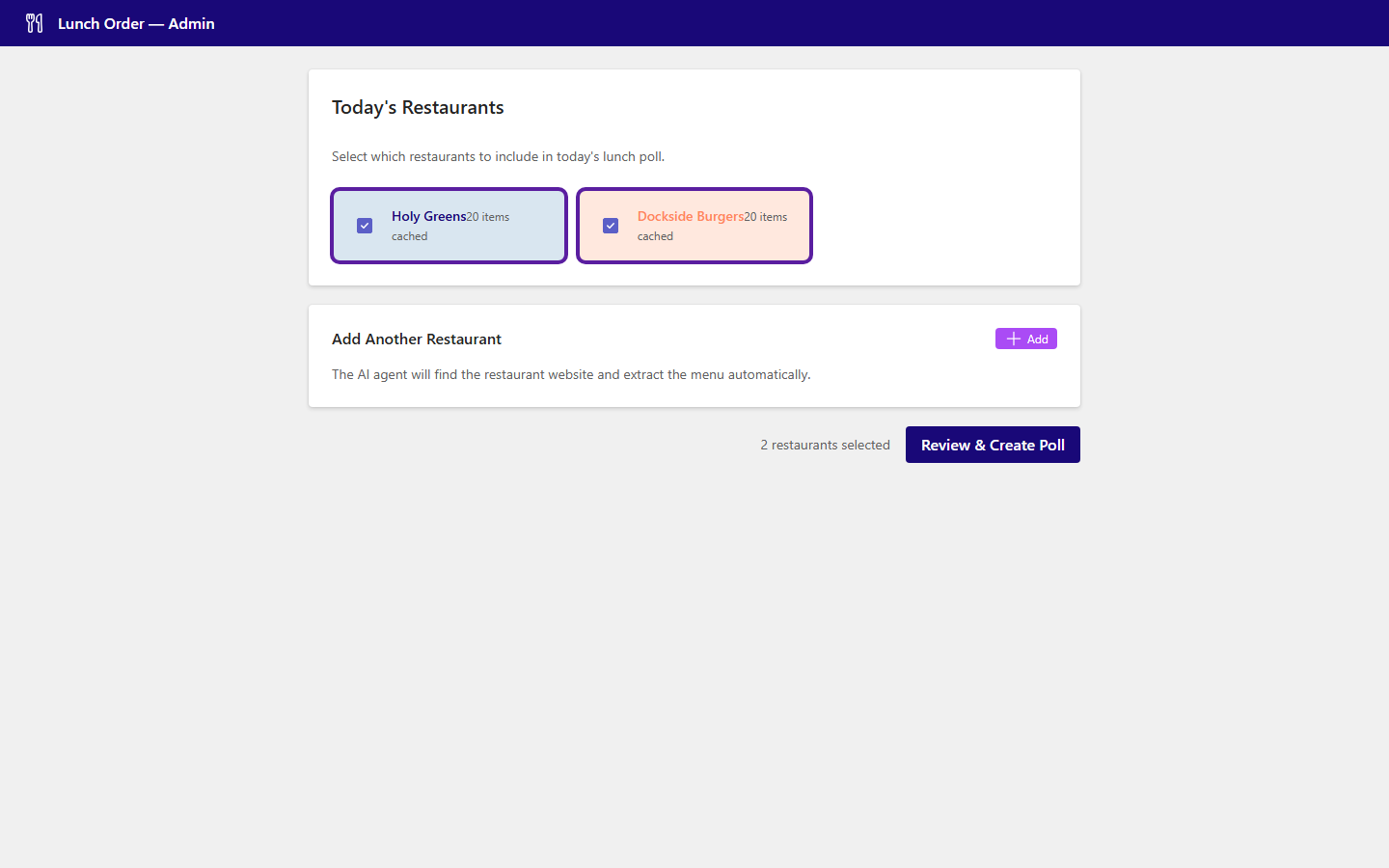
Admin panel showing cached restaurants

Step 3 β€” Add a New Restaurant (optional)

The AI agent can browse any restaurant website on demand and extract the menu automatically.
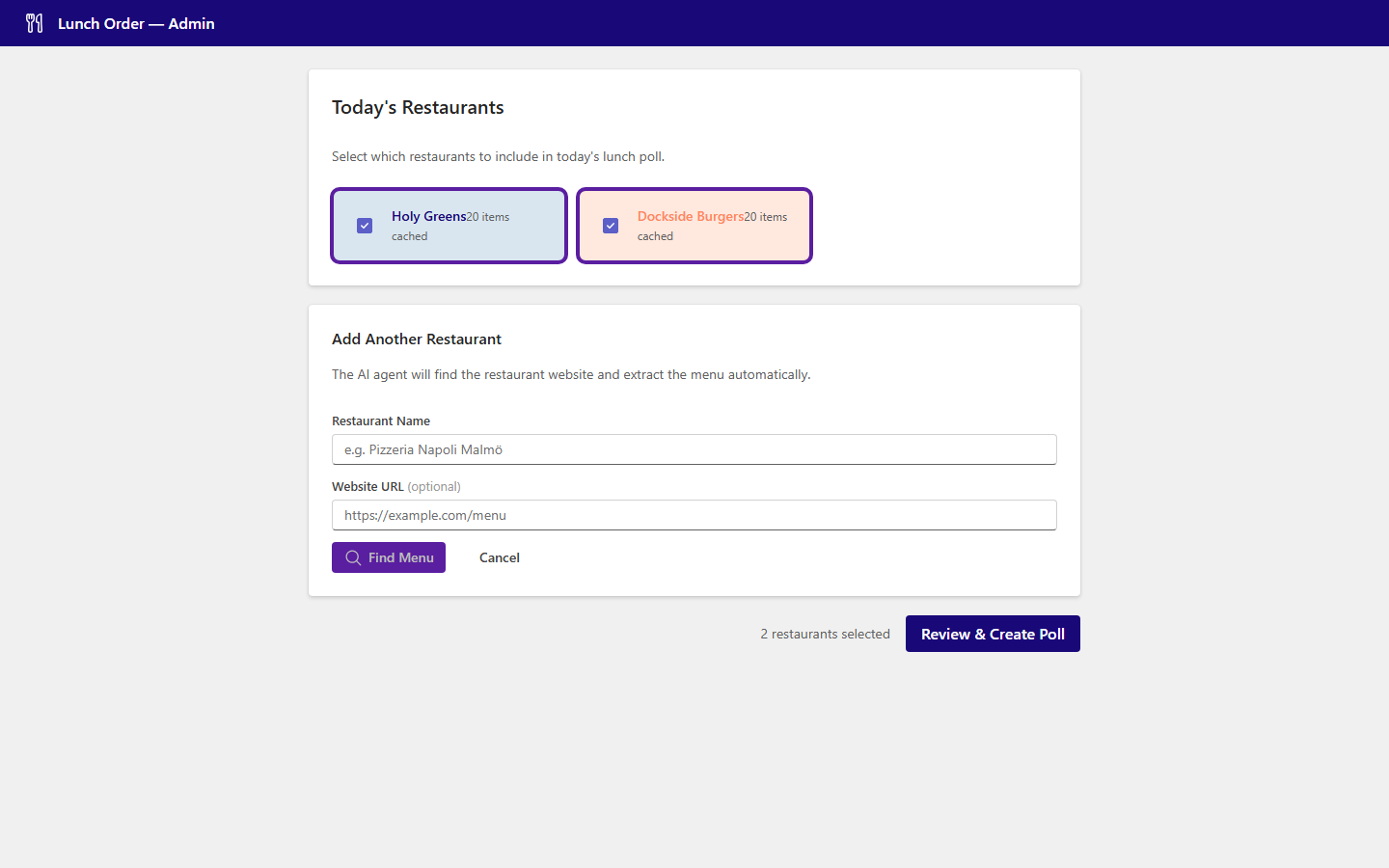
Add restaurant form

Step 4 β€” Review & Trim the Menu

The admin can deselect items before publishing β€” useful for removing sold-out or seasonal dishes.
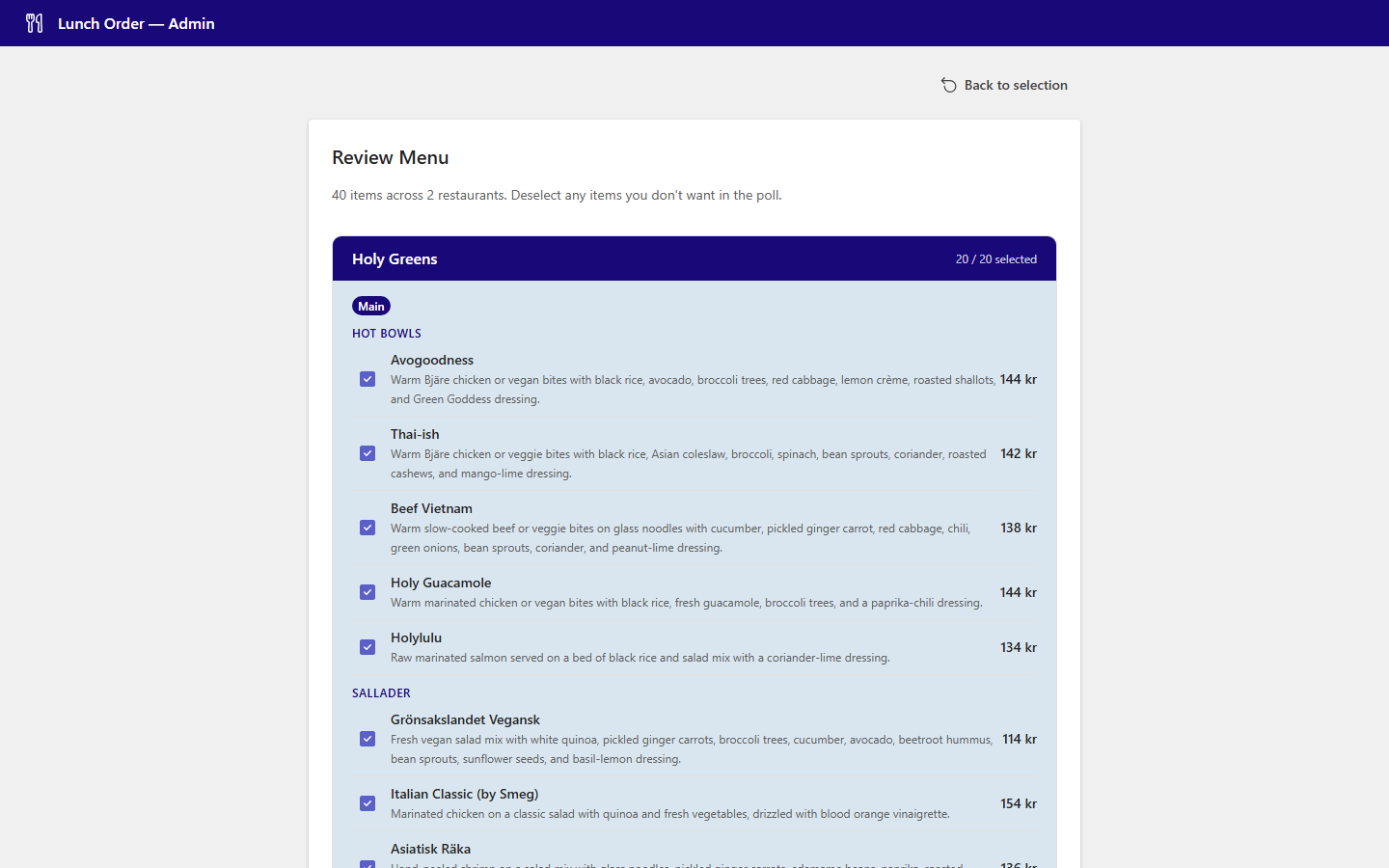
Menu review page

Step 5 β€” Create the Poll

One click creates a shareable link. The session is live immediately.
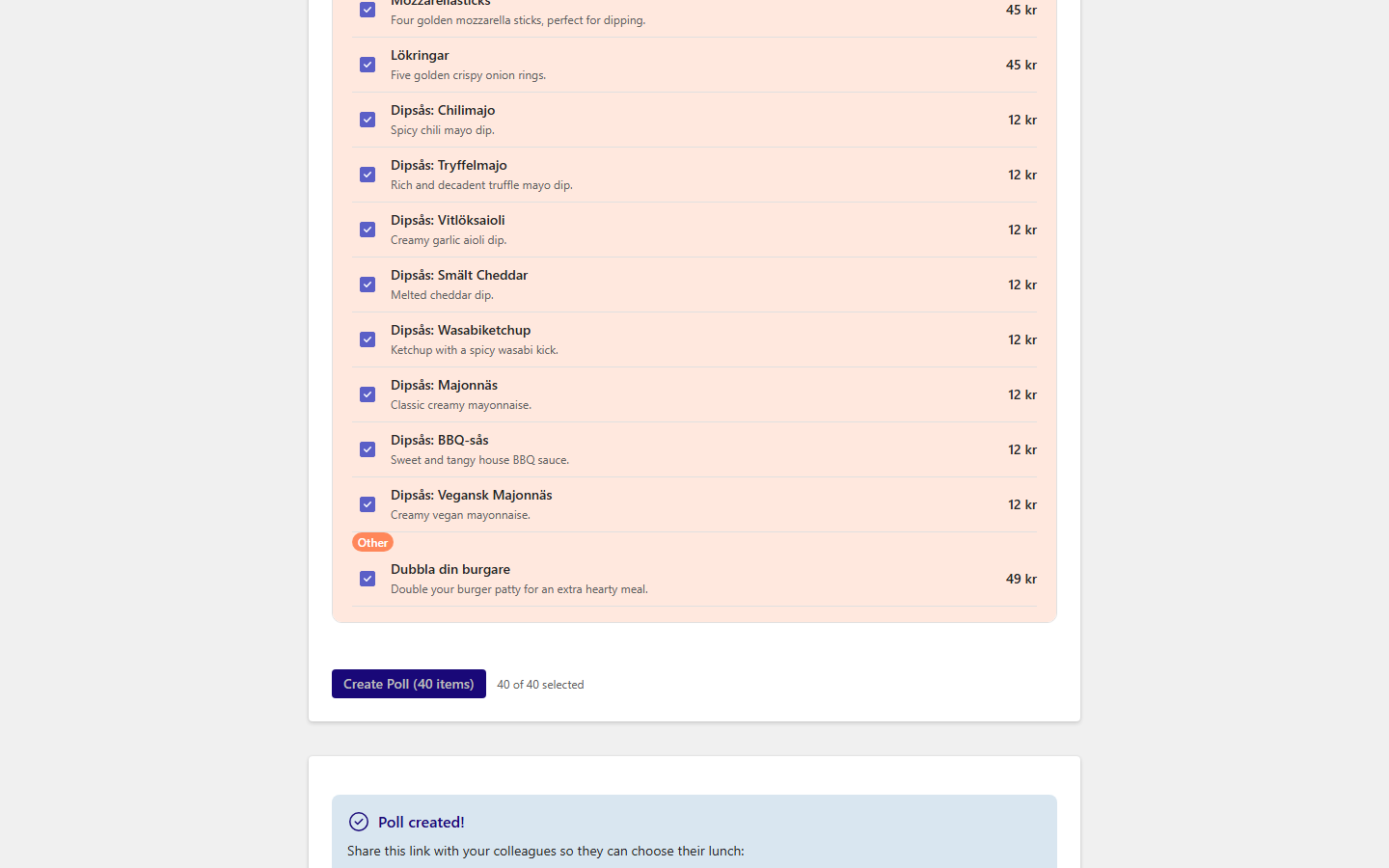
Poll created with shareable link

Step 7 β€” Select Items and Submit

Name, tick items, done. Orders arrive in real time on the admin’s screen.
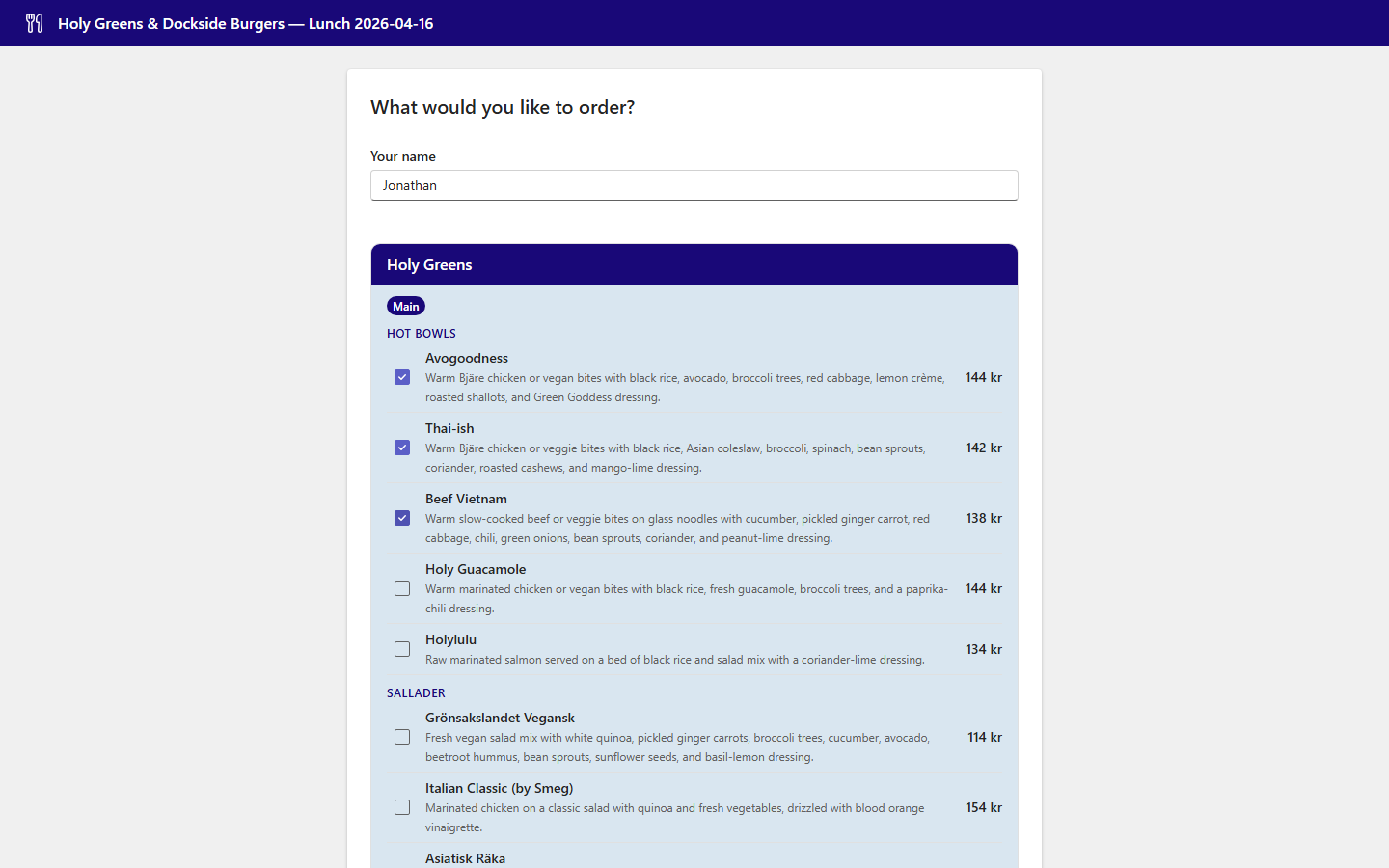
Order selection with items checked

Step 8 β€” Live Order Feed

Submitted orders appear instantly. The admin sees a running tally as the team orders.
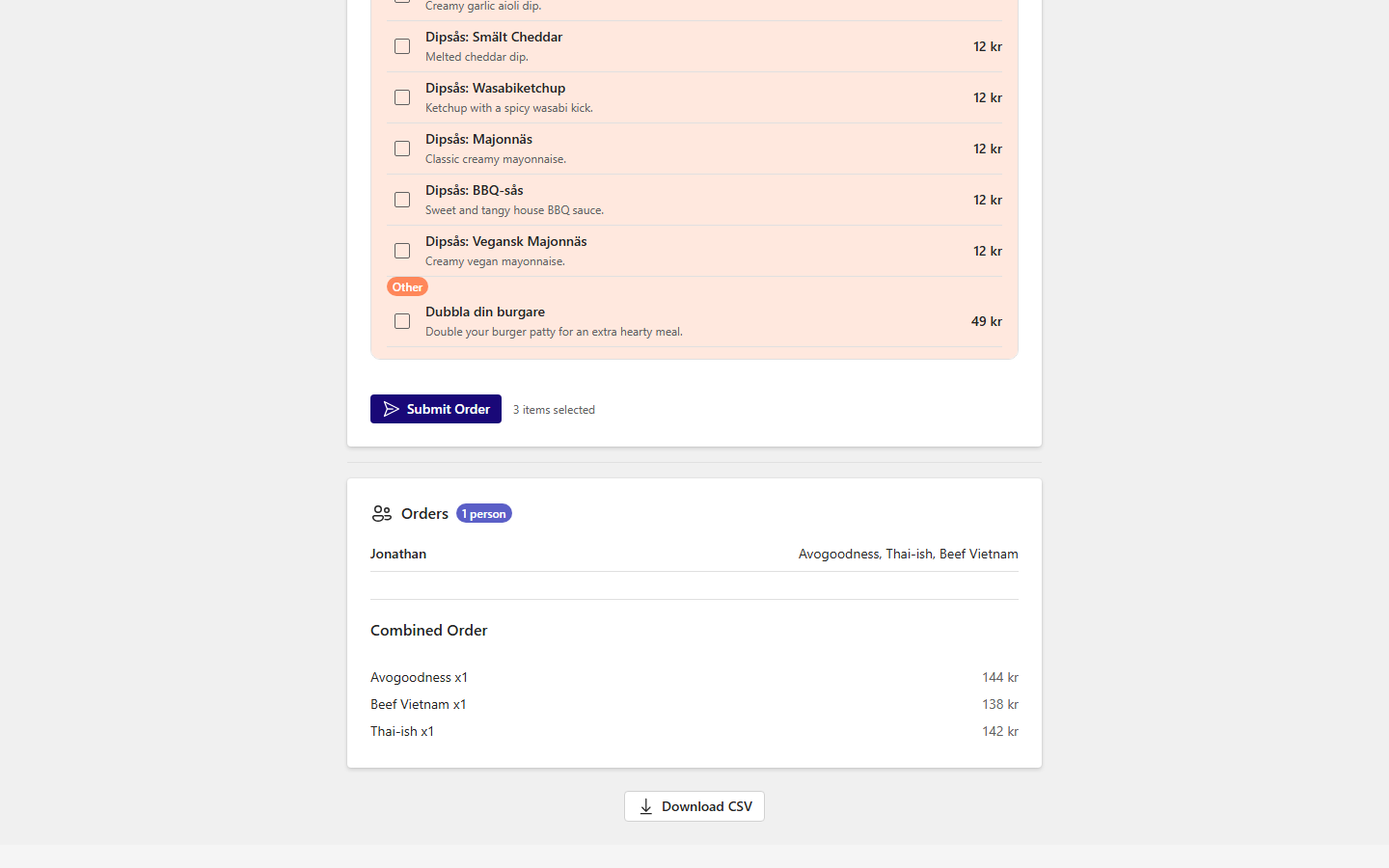
Live order list showing submitted orders

πŸ—οΈ System Architecture

High-Level Overview

flowchart TB
    subgraph Users["πŸ‘₯ Users"]
        Admin("Admin\nbrowser")
        Team("Team\nbrowsers")
    end

    subgraph App["🐳 Azure Container App"]
        React("React\nfrontend")
        FastAPI("FastAPI\nbackend")
        Scraper("Agentic\nscraper")
        Cache("Cached\nmenus.py")
    end

    subgraph LLMs["🧠 LLM Providers"]
        AzOAI("Azure\nOpenAI")
        OAI("OpenAI")
        Gemini("Google\nGemini")
    end

    subgraph CI["βš™οΈ GitHub Actions"]
        Scrape("Monthly\nscraper job")
        Deploy("Build &\ndeploy job")
    end

    subgraph Azure["☁️ Azure"]
        ACR("Container\nRegistry")
        Storage("Blob\nStorage")
    end

    Admin -->|HTTPS| React
    Team -->|HTTPS| React
    React -->|REST API| FastAPI
    FastAPI --> Scraper
    FastAPI --> Cache
    Scraper -->|fallback chain| AzOAI
    AzOAI -->|fails| OAI
    OAI -->|fails| Gemini
    FastAPI -->|sessions| Storage
    Scrape -->|refreshes| Cache
    Deploy -->|pushes image| ACR
    ACR -->|pulls| App

Scraper Subsystem

flowchart TD
    Start("Restaurant name\nor URL") --> Fetch("Fetch page")
    Fetch --> LLM("LLM reads page\n+ all links")
    LLM -->|extract| Done("Return\nMenuItems")
    LLM -->|navigate| Nav("Follow link")
    Nav --> Fetch
    LLM -->|search| Search("Gemini web\ngrounding")
    Search --> Fetch
    LLM -->|fail| Error("Return error")

    style Done fill:#1b9e77,color:#fff
    style Error fill:#d95f02,color:#fff
    style LLM fill:#190878,color:#fff

Session & Ordering Subsystem

sequenceDiagram
    participant Admin
    participant Backend
    participant Storage
    participant Team

    Admin->>Backend: POST /api/sessions {restaurants}
    Backend->>Storage: write session JSON
    Backend-->>Admin: {id, url}

    Admin->>Team: shares /session/{id} link

    Team->>Backend: GET /api/sessions/{id}
    Backend->>Storage: read session
    Backend-->>Team: menu items

    Team->>Backend: POST /sessions/{id}/orders {name, items}
    Backend->>Storage: append order
    Backend-->>Team: updated session (SSE push)
    Backend-->>Admin: SSE update

Deployment Pipeline

flowchart LR
    subgraph GH["GitHub"]
        Push("git push\nmain") --> CI("CI: compile\ncheck")
        Sched("Cron 3rd\nof month") --> Scrape("Scrape &\ncompare")
        Scrape -->|menus changed| Build
    end

    subgraph Azure["Azure"]
        Build("Docker\nbuild") --> ACR("Push image\nto ACR")
        ACR --> Update("Update\nContainer App")
        Update --> Live("Live\nrevision")
    end

    style Live fill:#1b9e77,color:#fff

πŸ•·οΈ How Does the Scraper Work?

🧠 An LLM That Browses Like You Do

Traditional Scraper vs. Agentic Scraper βš”οΈ

Traditional

  • Hardcoded URL per restaurant
  • CSS or XPath selectors
  • Breaks when the site changes
  • One script per restaurant

Agentic

  • Starts from homepage or web search
  • LLM reads the page and decides what to do
  • Follows links to find the menu
  • Same code for every restaurant

Four Actions, One Decision Model 🎯

MAX_STEPS = 8

class BrowseDecision(BaseModel):
    action: str   # "extract", "navigate", "search", "fail"
    reason: str
    url: Optional[str] = None    # for "navigate"
    query: Optional[str] = None  # for "search"

Pydantic Guarantees the Output Shape πŸ”’

class MenuCategory(str, Enum):
    main = "main"
    side = "side"
    drink = "drink"
    dessert = "dessert"
    other = "other"

class ExtractedMenuItem(BaseModel):
    name: str
    price: Optional[Decimal] = None
    category: MenuCategory
    description: Optional[str] = None
  • LLM output validated automatically
  • Categories enforce consistent grouping
  • Frontend can rely on the shape
  • Adding a restaurant = zero code changes
  • Price normalization handles β€œ125:-”, β€œ125 kr”, β€œ125 SEK”

When Things Go Wrong πŸ›‘οΈ

LLM provider fallback

flowchart TD
    A("Azure OpenAI") -->|"fails"| B("OpenAI")
    B -->|"fails"| C("Google Gemini")
    style A fill:#190878,color:#fff

If one provider is down or rate-limited, the next one picks up automatically.

Scraper resilience

  • 403 Forbidden? Falls back to web search
  • PDF menu? Extracts text with PyMuPDF
  • Wrong page? LLM navigates away
  • Infinite loop? MAX_STEPS = 8 stops it
  • No menu found? Returns a clear error

πŸ”Œ What is MCP?

πŸ”Œ USB-C for AI Applications

MCP Connects AI Apps to Tools and Data 🌐

Model Context Protocol is an open standard that lets any AI client call any tool through a shared interface β€” like USB-C for AI.

flowchart LR
    H("AI App - Host") --> C("MCP Client")
    C --> S("MCP Server")
    S --> T("Tools")
    S --> D("Data Sources")

FastAPI vs. FastMCP: Spot the Difference πŸ”

FastAPI endpoint

from fastapi import FastAPI

app = FastAPI()

@app.post("/menu")
async def get_menu(
    restaurant_name: str,
    menu_url: str = "",
) -> dict:
    """Fetch a restaurant menu."""
    return await get_restaurant_menu(
        restaurant_name,
        menu_url=menu_url or None,
    )

Called by: your frontend code

FastMCP tool

from fastmcp import FastMCP

mcp = FastMCP("lunch-menu-poll")

@mcp.tool
async def get_menu(
    restaurant_name: str,
    menu_url: str = "",
) -> dict:
    """Fetch a restaurant menu."""
    return await get_restaurant_menu(
        restaurant_name,
        menu_url=menu_url or None,
    )

Called by: any LLM client

Same function, same types, same docstring β€” but now any AI app can discover and call it.

One Codebase, Three Front Doors

flowchart TB
    subgraph Consumers
        CS("Copilot Studio")
        TB("Teams Bot")
        WA("Web App")
    end
    subgraph MCP
        Tool("get_menu_poll")
    end
    subgraph Scraper
        Browse("browse_and_extract")
        Extract("extract_menu")
        Models("Pydantic models")
    end
    CS --> Tool
    TB --> Tool
    WA --> Tool
    Tool --> Browse
    Browse --> Extract
    Extract --> Models

πŸ“Š Monitoring & Operations

What We Have Today

Observability

  • Log Analytics workspace β€” all container logs streamed automatically
  • GitHub Issues β€” monthly scrape report with per-restaurant diffs
  • Container App revision history β€” easy rollback to any previous image
  • Health endpoint β€” GET /api/health returns {"status": "ok"}

Operational hygiene

  • [skip ci] on menu commits β€” prevents CI loops
  • Concurrency lock on scraper job β€” no overlapping runs
  • LLM fallback chain β€” survives single provider outages
  • uv.lock β€” reproducible dependency snapshots across CI and Docker

What’s Missing for True Production

flowchart LR
    subgraph Now["βœ… Today"]
        Logs("Log Analytics")
        Issues("GitHub Issues")
        Health("Health endpoint")
    end

    subgraph Soon["πŸ”œ Next steps"]
        Alerts("Azure Monitor\nalerts")
        Dash("App Insights\ndashboard")
        SLA("Uptime\nchecks")
    end

    subgraph Later["πŸ“… Later"]
        Audit("Audit log\n(who ordered what)")
        Cost("Cost tracking\nper run")
        Rate("Rate limiting\n& auth hardening")
    end

πŸš€ Next Steps to Production

Three Priority Tracks

Auth Replace shared password with Azure AD / Teams SSO

Scale Persistent session storage β€” Blob today, Cosmos DB at scale

UX Teams bot IT approval β€” same MCP tool, richer surface

Production Readiness Checklist

πŸŽ“ What Did We Learn?

Three Ideas to Take With You πŸ’‘

Agency Let LLMs navigate, not just parse

MCP Build once, connect everywhere

Pydantic Structured outputs you can trust

Thank You β€” Questions? πŸ™

Follow along on GitHub at github.com/j-jayes/literate-broccoli

CLOSING SLIDE

Nexer symbol

CTL + ALT + DELISH

Built with FastMCP, FastAPI, and React.

Appendix

Copilot Studio: Great for 1:1, Not for Group Polls πŸ™…

  • Built a Copilot Studio agent with MCP tool access
  • Works perfectly in a 1:1 conversation
  • Can search for menus, extract items, show results
  • Cannot create a poll in a group chat
  • Lunch ordering is collaborative!

flowchart LR
    U("User") --> CS("Copilot Studio")
    CS --> MCP("MCP Scraper")
    CS -.->|"Cannot"| GP("Group Poll")
    style GP stroke:#ff5028,stroke-dasharray: 5 5

Three Attempts, One Scraper πŸ”„

flowchart LR
    CS("Copilot Studio") --> S("MCP Scraper")
    TB("Teams Bot") --> S
    WA("Web App") --> S
    style S fill:#190878,color:#fff

The Teams bot is not yet IT-approved β€” so today we demo the web app. But the scraper powering all three is identical.